WordPress Full Site Editing: What Enterprise Teams Need to Know
23 April 2026 •
10 mins read
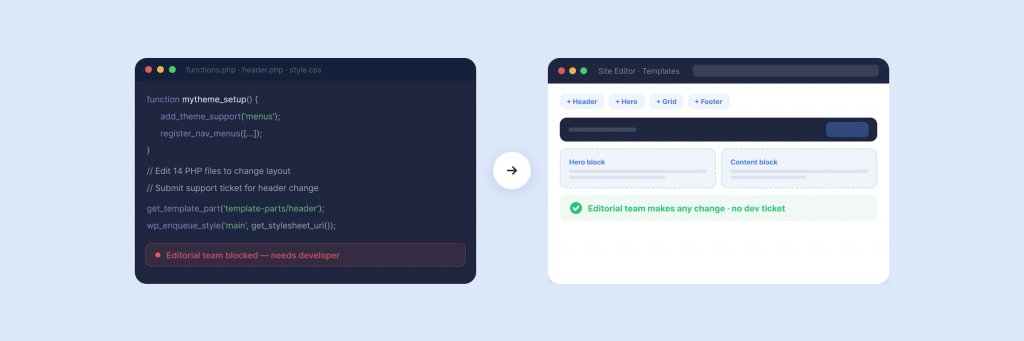
Your marketing director needs the homepage header updated across twelve regional sites. Under the old approach — classic WordPress theme, custom PHP templates, a support ticket to the development team — that’s a sprint task. Under WordPress full site editing, it’s a ten-minute job in the Site Editor, no code, no ticket, no waiting. That shift sounds simple. For enterprise teams managing complex WordPress estates, the implications run much deeper than saving time on header changes.
What Full Site Editing Actually Is
Full site editing — FSE — extends the WordPress block editor beyond post and page content to the structural elements of your site: headers, footers, navigation, templates, and template parts. Everything that previously required PHP template files and developer intervention is now editable through a visual interface called the Site Editor.
The system rests on four components. Block themes replace classic PHP themes with HTML-based templates built from blocks. The Site Editor provides the visual interface for editing those templates. Global Styles lets you control typography, colours, spacing, and layout from a single panel. And theme.json — a configuration file at the root of your theme — acts as the central authority for what editors can and cannot change.
FSE has been stable since WordPress 6.2 and has matured through multiple releases since. The default WordPress theme is a block theme. The WordPress Training Team launched a dedicated block theme development cohort in early 2026. This is no longer a beta experiment — it’s the direction WordPress is built around.
What Actually Changes for Enterprise Teams
The headline benefit is editorial independence. Marketing teams can modify site-wide elements — headers, footers, archive layouts, 404 pages — without raising development tickets. But for enterprise organisations, the meaningful changes go beyond that.
Template Editing Without Code Deployments
In a classic theme, changing how your blog archive displays posts requires editing a PHP template, committing the change, and deploying it through your CI/CD pipeline. With a block theme, that same change happens in the Site Editor. A content lead can adjust the layout, reorder elements, and preview the result before saving — all within the WordPress admin. For teams running multisite WordPress networks, this means structural updates can propagate without coordinating code releases across environments.
Design Consistency Without Design Systems
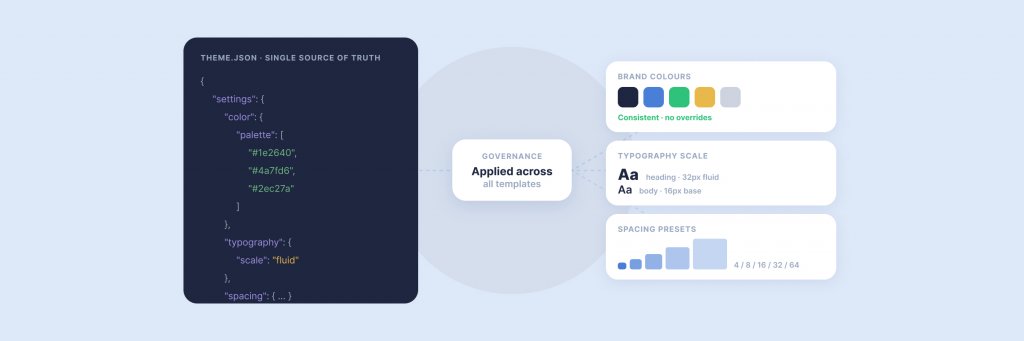
Enterprise teams spend significant resource maintaining design consistency across large content estates. Global Styles changes that calculus. A colour update in the Global Styles panel cascades across every page, every template, every block that references that token. Typography scales, spacing presets, and button styles all follow the same logic. The design system lives inside the CMS rather than in a separate document that content editors may or may not follow.
Reduced Developer Dependency for Routine Changes
This is the change that matters most operationally. When every structural change requires developer involvement, content velocity is gated by sprint capacity. FSE doesn’t eliminate the need for developers — complex functionality, custom blocks, and integrations still require engineering. But it does remove developers from the critical path for the routine template and layout changes that previously consumed a disproportionate share of their time.
Enterprise WordPress at Filter
We build and maintain enterprise WordPress platforms for organisations including JD Wetherspoon, Medivet, and Inspired Villages. Talk to us about your WordPress estate.
theme.json: The Enterprise Governance Layer
If there’s one feature that makes FSE genuinely relevant for enterprise teams rather than just a convenience for smaller sites, it’s theme.json. This single configuration file controls what content editors can access across the entire Site Editor — and more importantly, what they can’t.
Set defaultPalette to false, and the standard WordPress colour picker vanishes. Editors see only your approved brand colours. Disable custom font sizes, and content creators choose from your defined typography scale rather than typing arbitrary pixel values. Lock spacing presets, and the visual rhythm of your pages stays consistent regardless of who’s editing.
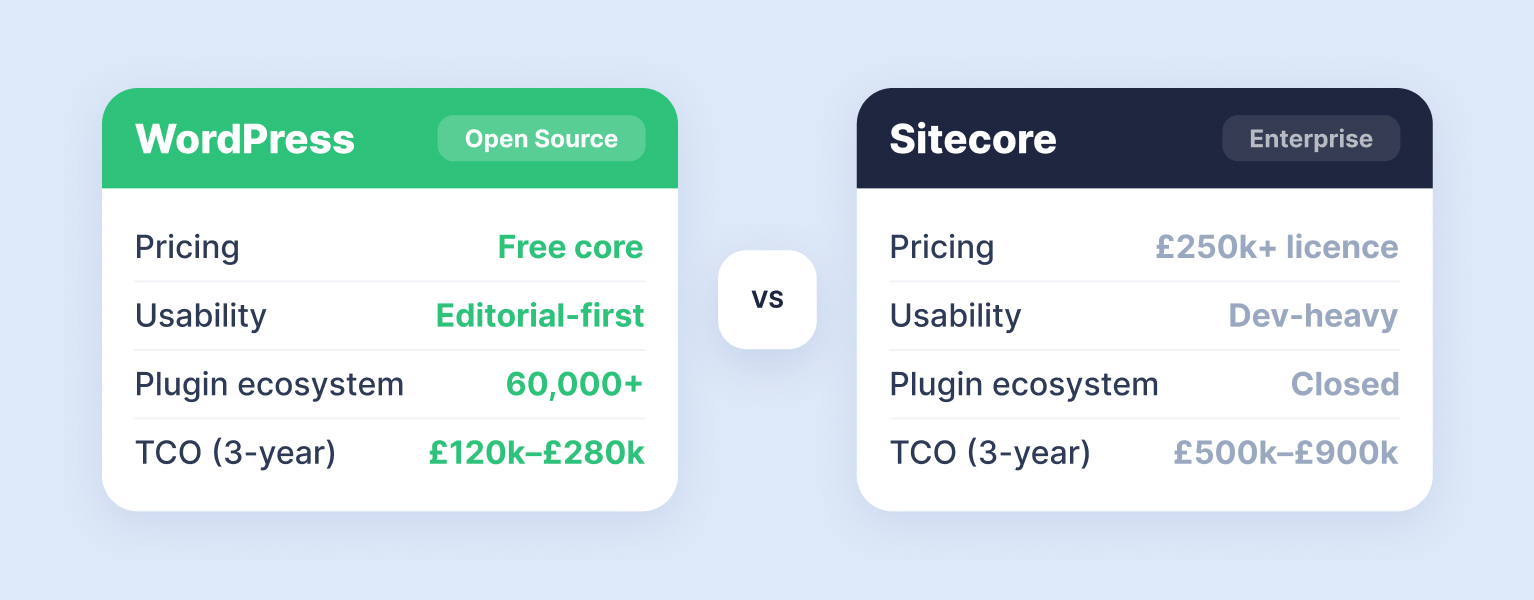
For organisations operating under strict brand guidelines — financial services, healthcare, regulated industries — this level of guardrail was previously achievable only through expensive DXP platforms like Optimizely or Sitecore, or through heavily customised WordPress admin interfaces. theme.json delivers it natively, without additional plugins or development overhead.
The WordPress developer documentation on Global Settings and Styles covers the full schema. In practical terms, the file lets you control colour palettes and gradients, typography families, sizes, and fluid scaling, layout widths and content constraints, spacing presets and block gaps, and which blocks are available in the inserter. For enterprise multisite networks, theme.json can be version-controlled and deployed centrally, enforcing brand governance across every site in the network from a single source of truth.
Style variations extend this further. You can ship multiple visual configurations within the same block theme — a UK variant and a US variant, a corporate palette and a sub-brand palette — and let site administrators choose between them without altering the underlying code. For businesses managing regional sites or sub-brands on a shared WordPress platform, this solves a problem that previously required entirely separate theme builds.
The Migration Reality: Classic to Block
Moving from a classic PHP theme to a block theme isn’t a weekend project. For enterprise sites with years of accumulated custom templates, widget areas, customiser settings, and bespoke functionality, the migration requires careful planning and a realistic timeline.
The recommended approach — and the one we use at Filter — is hybrid migration. Rather than rebuilding everything at once, you convert templates incrementally. WordPress supports a transitional state where classic and block-based templates coexist, allowing you to migrate page by page, template by template, without an all-or-nothing cutover.
Start by auditing your current theme. Document every PHP template file, every widget area, every customiser setting, and every piece of custom functionality. Map each one to its FSE equivalent. Some will translate directly — a PHP header template becomes a header template part in blocks. Others require rethinking. Classic widgets have no direct FSE equivalent; they need to be rebuilt as blocks or block patterns. Custom customiser panels need to be replaced with theme.json settings or Global Styles controls.
The migration sequence that works best for most enterprise sites is to begin with the header and footer (high visibility, relatively contained), move to archive and single-post templates (broad impact, usually less complex), then tackle page templates (often the most customised and variable), and finally address custom post type templates and specialist layouts. At each stage, test thoroughly. FSE templates render differently from their PHP predecessors — spacing, margins, and block alignment may need adjustment even when the visual output appears similar.
For organisations weighing up the investment, the question isn’t whether FSE is the future — it is. The question is when the migration makes sense relative to your current roadmap and the remaining life of your existing theme. If you’re planning a site redesign or migrating from another platform, building on a block theme from the start is the clear choice. If your current classic theme is stable and well-maintained, a phased migration timed to natural development milestones is more sensible than a standalone project.
Where FSE Falls Short
There is no point pretending FSE solves everything. Enterprise teams should go in with clear expectations about where the limitations sit today.
Plugin compatibility is still uneven. The WordPress plugin ecosystem has largely adapted, but “largely” isn’t “entirely”. Some older plugins — particularly those that rely on classic widget areas or the WordPress Customizer — don’t function correctly in block theme environments. Before migrating, audit your plugin stack. Any plugin that hooks into widget_init, uses the Customizer API, or registers classic sidebars needs testing against your target block theme. Most major plugins have updated, but niche or legacy tools may need replacing.
The learning curve is genuine. Content editors comfortable with the classic editor or page builders will need time to adjust to the block editor’s template-level capabilities. The Site Editor interface is powerful, but it’s also unfamiliar — and giving someone template-level access without training is a recipe for accidental changes that ripple across the site. Invest in training before go-live, and consider using theme.json to restrict editing capabilities until teams are confident.
Complex layouts still need development. FSE handles standard layouts well. But if your site relies on highly custom interactive components — bespoke calculators, multi-step forms, dynamic data integrations — those still require custom block development. FSE hasn’t eliminated the need for developers; it’s shifted their focus from routine template work to higher-value feature development.
Performance isn’t automatic. Block themes don’t guarantee faster sites. Large numbers of nested blocks, heavy use of client-side rendering, and unoptimised images can still create performance problems. The advantage FSE offers is structural — cleaner markup, fewer dependencies on third-party page builders, and better alignment with Core Web Vitals requirements. But performance still requires deliberate attention to how blocks are configured and what assets they load.
FSE and Headless WordPress: Where Each Fits
Enterprise teams evaluating FSE often ask how it relates to headless WordPress. The short answer: they solve different problems.
FSE is about giving editorial teams more control over a WordPress-rendered front end. Headless WordPress decouples the CMS from the front end entirely, serving content via the REST API or WPGraphQL to a separately built interface — typically React, Next.js, or a similar framework. Headless suits organisations that need total front-end freedom, multi-channel content delivery, or performance characteristics that server-rendered WordPress can’t easily achieve.
FSE suits organisations where the WordPress front end is the primary output and the goal is to make that front end more manageable without constant developer involvement. For most enterprise WordPress sites — corporate platforms, content-heavy marketing sites, multisite estates — FSE delivers the practical benefits without the architectural complexity and cost of a headless build. Our explainer on headless CMS covers the trade-offs in more depth if your team is weighing both options.
WordPress vs Sitecore: Which CMS Is Right for You?
Considering your CMS options? We compare WordPress and Sitecore across pricing, usability, security, and scalability to help you choose the right platform.
Is Your Team Ready? A Practical Assessment
Before committing to an FSE migration or a new build on a block theme, run through these questions with your team. They won’t give you a score — but they’ll surface the conversations you need to have before the project starts.
How much of your current development time goes to routine template changes? If developers spend significant hours each month on header tweaks, layout adjustments, and template modifications that don’t involve complex logic, FSE will free that capacity for higher-value work. If most development time is already spent on custom integrations and feature builds, the operational savings will be smaller.
How strict are your brand governance requirements? Organisations with tightly controlled visual standards benefit most from theme.json’s ability to lock down the editing environment. If brand consistency is enforced primarily through process and review rather than technical controls, FSE’s governance features offer a material upgrade.
How complex is your current theme? A classic theme with ten to fifteen templates and straightforward layouts is a manageable migration. A theme with fifty custom templates, extensive Customizer integration, and heavy reliance on legacy widgets is a larger undertaking that needs proper scoping and phasing.
Is your plugin stack compatible? Test your critical plugins in a block theme staging environment before committing. ACF, Yoast, WooCommerce, and most major plugins work well with FSE. Smaller or older plugins may not. Identify gaps early.
Does your hosting support the current WordPress version? FSE requires WordPress 6.2 or later, and the best experience comes from running the latest stable release. Enterprise hosting on WP Engine or WordPress VIP — both of which we partner with at Filter — supports this as standard. Legacy hosting environments may need upgrading.
Getting Started
WordPress full site editing represents the most significant change to how enterprise teams interact with WordPress since the platform moved to the block editor in 2018. The technology is mature, the ecosystem has adapted, and the governance capabilities through theme.json solve problems that enterprise teams have been working around for years.
The decision isn’t whether to adopt FSE — it’s when, and how to sequence the transition in a way that doesn’t disrupt your current operation. For teams planning a new build or a redesign, starting on a block theme is the straightforward choice. For teams running stable classic themes, a phased migration aligned to your development roadmap is the pragmatic path.
At Filter, we build enterprise WordPress platforms for organisations including JD Wetherspoon, Medivet, and Inspired Villages — and we’ve been working with block themes and FSE since the early releases. Whether you’re evaluating FSE for a new project or planning a migration from a classic theme, our team can help you scope the work, identify the risks, and build a timeline that makes sense for your organisation.
Having worked in agencies since he left university, Paul drives both the technical output at Filter, as well as being responsible for planning. His key strengths are quickly understanding client briefs and being able to communicate complex solutions in a clear and simple manner.
Our guide shows digital leaders and development teams how structured data earns AI citations now that systems like ChatGPT and AI Overviews, not rich results, decide visibility.
Download our practical guide to AI and WordPress, covering the new Abilities API, MCP Adapter and AI Client in core, plus how to prepare your platform for the agentic web.
Sitecore to WordPress: What to Expect from the Migration
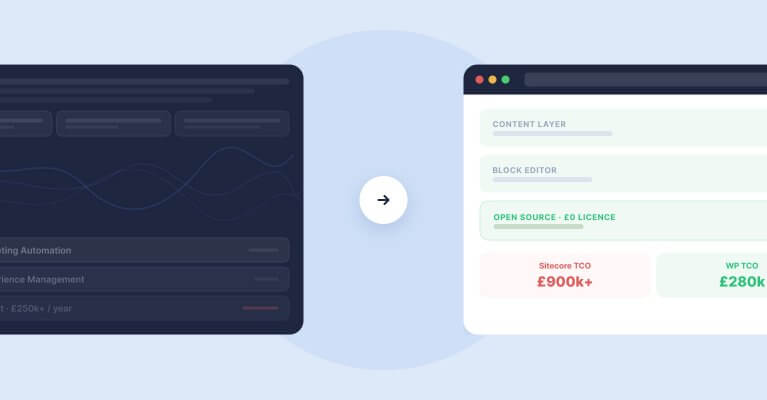
Your Sitecore contract renewal is approaching and the numbers no longer add up. Before you commit to a migration, here is what actually happens when enterprise teams move from Sitecore to WordPress — the real costs, the content challenges, the SEO risks, and the decisions that separate smooth transitions from expensive false starts.