Filter Abilities is our open-source plugin that gives AI assistants like Claude direct access to your WordPress content, SEO data, and visitor analytics.
WordPress 6.9 shipped one of its most consequential updates in years: the Abilities API. This foundational layer gives WordPress a standardised way to describe what actions are possible on a site, who can perform them, and what inputs and outputs they expect. When paired with the Model Context Protocol (MCP) and a purpose-built abilities plugin, the result is transformative: an AI assistant that can talk directly to your WordPress site, understand its content, manage its SEO, and even analyse your visitor data.
At Filter, we have been building exactly this. Here is how we did it, what it enables, and why we think every WordPress agency should be paying attention.
The Abilities API, introduced in WordPress 6.9 as part of the AI Building Blocks initiative, provides a central registry where WordPress core, plugins, and themes can register discrete units of functionality in a machine-readable format. Each registered “ability” includes its inputs, outputs, permission requirements, and execution logic.
Before the Abilities API, WordPress functionality was scattered across custom functions, AJAX handlers, REST endpoints, and plugin-specific implementations. If an external tool wanted to interact with a WordPress site, it needed to know the specific endpoint, authentication method, and payload format for each individual feature. The Abilities API solves this by creating a single, discoverable catalogue of everything a site can do.
For developers, this means you can register an ability once and access it from PHP, the REST API, and (crucially for this post) AI agents. The API handles validation, permissions, and execution consistently regardless of where the request originates.
The Model Context Protocol is an open standard that defines how AI applications provide and receive context. Think of it as a universal language that allows AI assistants like Claude, ChatGPT, Cursor, and others to discover what tools are available and use them in a structured, predictable way.
In practical terms, MCP defines a server that exposes “tools” (actions the AI can take), “resources” (data the AI can read), and “prompts” (structured templates for common tasks). An AI client connects to an MCP server, discovers what is available, and then calls those tools as part of a natural conversation.
The important thing to understand is that MCP is not WordPress-specific. It is a protocol adopted across the AI ecosystem. By supporting MCP, WordPress positions itself to work with any AI tool that speaks the same language.
The Model Context Protocol is an open standard that defines how AI applications provide and receive context. Think of it as a universal language that allows AI assistants like Claude, ChatGPT, Cursor, and others to discover what tools are available and use them in a structured, predictable way.
In practical terms, MCP defines a server that exposes “tools” (actions the AI can take), “resources” (data the AI can read), and “prompts” (structured templates for common tasks). An AI client connects to an MCP server, discovers what is available, and then calls those tools as part of a natural conversation.
The important thing to understand is that MCP is not WordPress-specific. It is a protocol adopted across the AI ecosystem. By supporting MCP, WordPress positions itself to work with any AI tool that speaks the same language.
The official WordPress MCP Adapter plugin acts as the bridge between the Abilities API and the MCP specification. It takes every ability registered on your WordPress site and automatically converts them into MCP tools that AI agents can discover and execute.
While the WordPress MCP Adapter provides the transport layer, it needs abilities to expose. WordPress core ships with a handful of basic abilities for site information and user details, but the real power comes from plugins that register their own.
This is where our open-source Filter Abilities plugin comes in. We built Filter Abilities to expose the day-to-day operations that a digital team actually needs through the Abilities API. It registers 36 abilities across several modules, which combine with the 3 core WordPress abilities (site info, user info, and environment info) to give you 39 tools available to your AI agent out of the box:
Content Management covers the essentials: listing, creating, updating, and retrieving posts of any type, complete with taxonomy support and Advanced Custom Fields integration. An AI assistant can search your content library, create drafts with the right categories applied, or audit content across post types.
Taxonomy Management allows listing terms from any registered taxonomy, plus creating, updating, and deleting terms. This is particularly useful for content organisation tasks that would otherwise involve clicking through multiple admin screens.
Media Library abilities let you browse the media library, and also identify images that are missing alt text. Given the SEO and accessibility implications of missing alt text, having an AI flag these for you is genuinely useful.
SEO (Yoast Integration) is where things get interesting. Filter Abilities exposes read and write access to Yoast SEO metadata, including titles, descriptions, focus keywords, and Open Graph data. It also includes an audit ability that finds published posts missing SEO titles, meta descriptions, or focus keywords. We have been using this on our own site to systematically backfill missing SEO data across hundreds of older posts.
Forms (Gravity Forms) abilities let you list all forms with their field definitions and pull submission entries with date filtering and pagination. This means an AI assistant can answer questions like “how many enquiries did we get last month?” by querying the data directly.
AI Batch Operations provide abilities to trigger batch processing for missing alt text, SEO titles, and SEO descriptions using Filter AI, our AI-powered content generation plugin for WordPress. The AI assistant can check how many items need attention, kick off a batch, and monitor its progress.
PersonalizeWP Integration is where the plugin becomes particularly powerful for agencies. We have exposed the full PersonalizeWP feature set: visitor analytics, contact profiles, audience segments, lead scoring rules, personalisation rules, and activity feeds. An AI assistant can tell you who has been visiting your site, what they have been looking at, and which segments they belong to. Filter Abilities essentially turns PersonalizeWP into a conversational analytics platform.
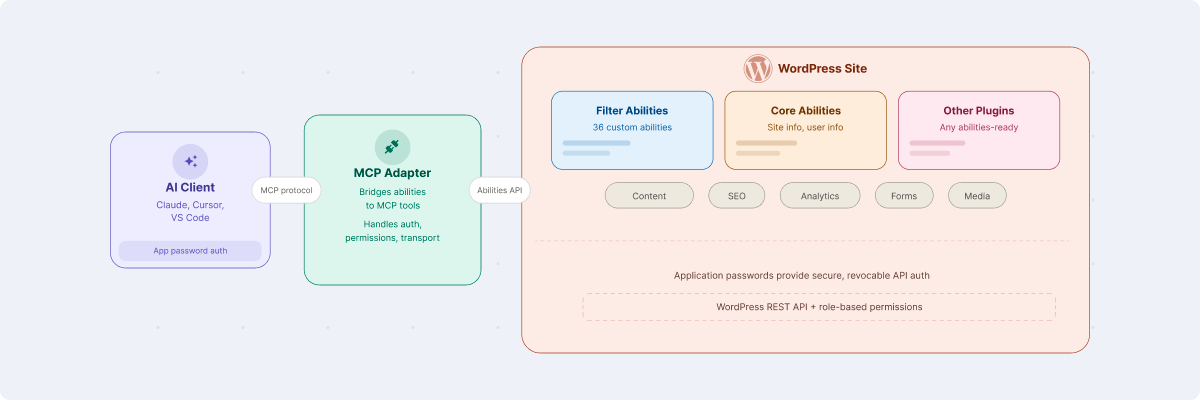
Getting this running on your own WordPress site involves three components. Here is exactly how we set it up on our own site:
You need two plugins active on your WordPress site:
The MCP Adapter will automatically detect and expose any abilities registered by Filter Abilities (and any other plugin using the Abilities API).
We recommend creating a dedicated WordPress user for MCP access rather than using your personal admin account. Give it a descriptive name like claude-agent or ai-assistant so its purpose is clear in your user list.
Choosing the right role is an important security decision. For read-only (querying content, checking SEO data, viewing visitor analytics) or creating/updating content, an Editor role is sufficient.
Editors can read and manage all posts, which covers the majority of Filter Abilities’ read operations including SEO audits, visitor analytics, and form entry queries.
The Administrator role should only be used if you specifically need abilities that require elevated capabilities, such as accessing site settings or plugin information. Avoid defaulting to Administrator out of convenience.
Once the user is created, go to the user’s profile and scroll down to the “Application Passwords” section. This is a WordPress feature that allows you to generate passwords specifically for API access without exposing your main login credentials.
Enter a name for the application password (something descriptive like “Claude Desktop”) and click “Add New Application Password”. WordPress will generate a password. Copy it immediately as it will not be shown again.
The final step is telling Claude where to find your WordPress MCP server. For Claude Desktop or Claude Code, edit the MCP configuration file and add a server entry:
{

 "mcpServers": {

  "my-wordpress-site": {

  "command": "npx",

  "args": [

   "-y",

   "@automattic/mcp-wordpress-remote@latest"

   ],

 "env": {

  "WP_API_URL": "https://yoursite.com/wp-json/mcp/mcp-adapter-default-server",

  "WP_API_USERNAME": "claude-agent",

  "WP_API_PASSWORD": "your-application-password"

   }

  }

 }

}
The @automattic/mcp-wordpress-remote package handles the client-side MCP communication. It connects to your WordPress site’s MCP endpoint, discovers available abilities, and translates them into tools that the AI can use.
After saving the configuration and restarting Claude, you should see the WordPress tools appear in the available tools list. You can verify this by looking for the MCP server in the tools panel.
Because MCP is an open standard, other AI clients are adding support too. At the time of writing, ChatGPT has MCP support in beta through its Developer Mode, and editors like Cursor and VS Code can also connect to MCP servers. The same WordPress endpoint works with any compatible client, though the setup steps vary and some implementations are more mature than others. We found Claude Desktop to be the most straightforward experience.
Here is where theory meets practice. Once everything is connected, here are some real examples of what becomes possible.
Using the PersonalizeWP integration, we can ask Claude to find all contacts who visited any URL matching /services/ and see their visit counts and most recent activity. This surfaces visitor engagement data without ever opening the WordPress admin. It is particularly useful for account managers preparing for client calls or sales teams identifying warm leads.
This was one of our first practical use cases. The filter/find-seo-issues ability identifies published posts without Yoast SEO titles, and the filter/update-seo-meta ability can set them. We used this workflow to audit and backfill SEO metadata across approximately 220 older news posts on our own site. The AI generates contextually appropriate SEO titles based on the post content and applies them, with us reviewing and approving each batch.
The Gravity Forms abilities let us query submission data directly. Rather than logging into WordPress, navigating to the forms section, and filtering by date, we simply ask. The AI retrieves the entries, counts them, and can even summarise the types of enquiries received.
PersonalizeWP’s segment and scoring data becomes conversational. The AI can list all audience segments, show how many contacts are in each, describe the conditions that define them, and highlight which segments are most active. This turns what would be a multi-screen admin workflow into a single question.
Content creation abilities mean the AI can create posts directly in WordPress with the right post type, status, categories, and tags applied. Combined with Filter AI’s content generation features, this creates a streamlined workflow from brief to draft without leaving the conversation.
The filter/site-info and filter/content-stats abilities provide an instant dashboard: WordPress version, active theme, installed plugins, post counts by type and status, media library size, and user count. It is a quick health check without logging in.
There are a few things about this setup that we think are worth highlighting, because they speak to the strength of the WordPress platform itself.
The Abilities API opens up WordPress to chat clients. By creating a standard way to describe functionality, WordPress has made it possible for any plugin to expose its features to AI agents without writing custom MCP code.
Plugin developers register abilities; the MCP Adapter handles the rest. This is the kind of foundational infrastructure that will compound in value as more plugins adopt it.
WordPress is ahead of the curve. While other CMS platforms are still working out how to integrate with AI tools, WordPress has shipped a production-ready, standardised API for exactly this purpose.
The Abilities API landed in core with version 6.9 in December 2025, the MCP Adapter is actively maintained, and WordPress 7.0 is extending the system with a client-side JavaScript counterpart.
Filter Abilities is open source and available on GitHub at filter-agency/filter-abilities. We built it because we needed it for our own workflow and because we believe the WordPress community benefits from practical examples of what the Abilities API makes possible.
Filter Abilities works best alongside our other plugins. Filter AI powers the batch content generation abilities (SEO titles, meta descriptions, and alt text), while PersonalizeWP provides the visitor analytics, audience segmentation, and lead scoring data that the PersonalizeWP abilities expose.
Each module in Filter Abilities gracefully detects whether the relevant plugin is active, so you only see the abilities that apply to your setup.
If you are a WordPress developer or agency looking to explore AI integration, this is an accessible starting point. The setup takes less than an hour, and the result is a genuine productivity improvement for content management, SEO auditing, and visitor analytics.
We would love to hear how you use it. If you have questions about the setup, ideas for new abilities, or want to contribute, find us on GitHub or get in touch using the form below.

CTO & Founder
Having worked in agencies since he left university, Paul drives both the technical output at Filter, as well as being responsible for planning. His key strengths are quickly understanding client briefs and being able to communicate complex solutions in a clear and simple manner.